Infographic E-commerce Marketing Strategy: 7 Ways to Boost Sales
June 18, 2025
Written by Mitul Dadhania, Founder & Google Ads Specialist at WebChanakya
15+ years managing PPC campaigns for 200+ Indian businesses
Last updated: June 2, 2026
Table of contents
- What is Google PPC?
- Factors Influencing Google Ads Pricing
- Performance Max Campaigns: What They Cost in India (2026)
- Performance Max in India: What to Watch Out For
- Smart Bidding in Google Ads: How Automated Bidding Affects Your Costs
- Average Cost-Per-Click (CPC) Rates
- Google Ads Budgeting Strategies
- Importance of Keyword Selection
- Additional Costs in Google Ads Management
- 18% GST on Google Ads in India: What It Means for Your Budget
- Comparing Google Ads Costs to Other Platforms
- Effective PPC Management Practices
- Common Questions About Google Ads Costs
What is Google PPC?
Google Ads in India cost between ₹5 and ₹3,000+ per click depending on your industry, with a 2026 average CPC of ₹24 for Search campaigns. A ₹30,000–₹50,000/month budget is a practical starting point for most small businesses. Legal, insurance, and finance sectors pay the highest CPCs (₹1,500–₹3,000+), while education and local services pay the lowest (₹5–₹50).
This guide covers every cost factor, industry benchmark, and budgeting strategy you need to plan your Google Ads investment in India.
Understanding Google Ads Pricing
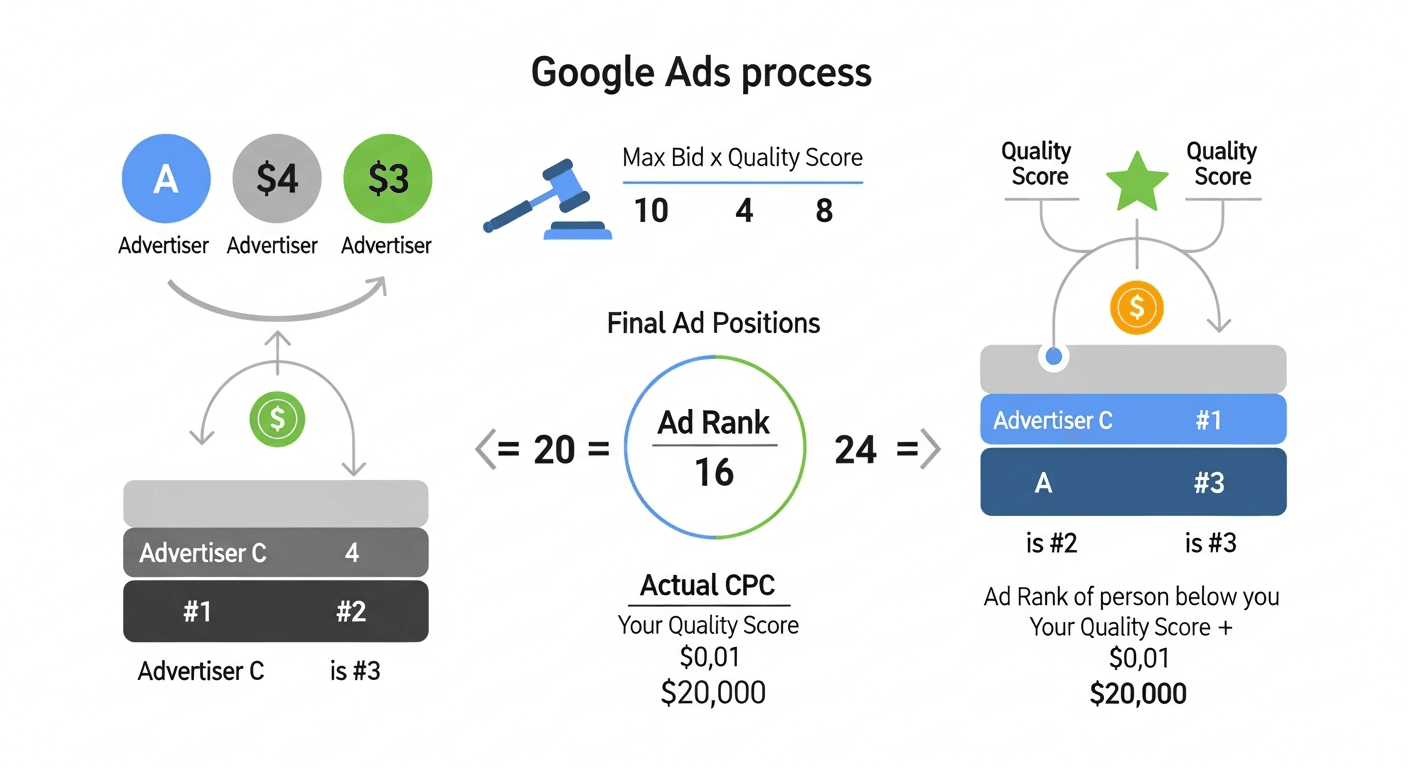
The Google Ads auction determines ad placement and cost based on Ad Rank, a score calculated from your bid and Quality Score.
Understanding Google PPC pricing is crucial for businesses looking to maximize their advertising return on investment (ROI). Here are several reasons why grasping these concepts can significantly influence a company's marketing strategy:
- Budget Management: Knowing the average costs associated with clicks or impressions helps businesses allocate their advertising budget more effectively. For instance, if a business intends to spend $1,000 monthly, understanding the costs per click aids in estimating potential traffic volumes.
- Enhanced Competitive Edge: Familiarity with PPC pricing can guide businesses in identifying optimal keywords for their campaigns. With insight into industry averages, marketers can outbid competitors more strategically.
- Maximized ROI: By grasping the relationship between ad costs and their outcomes, like sales or leads, companies can make informed decisions that drive both visibility and conversions.
- Effective Strategy Development: Understanding the factors that control costs, such as ad quality and relevance, equips businesses to create higher-quality ads that can lower their cost-per-click.
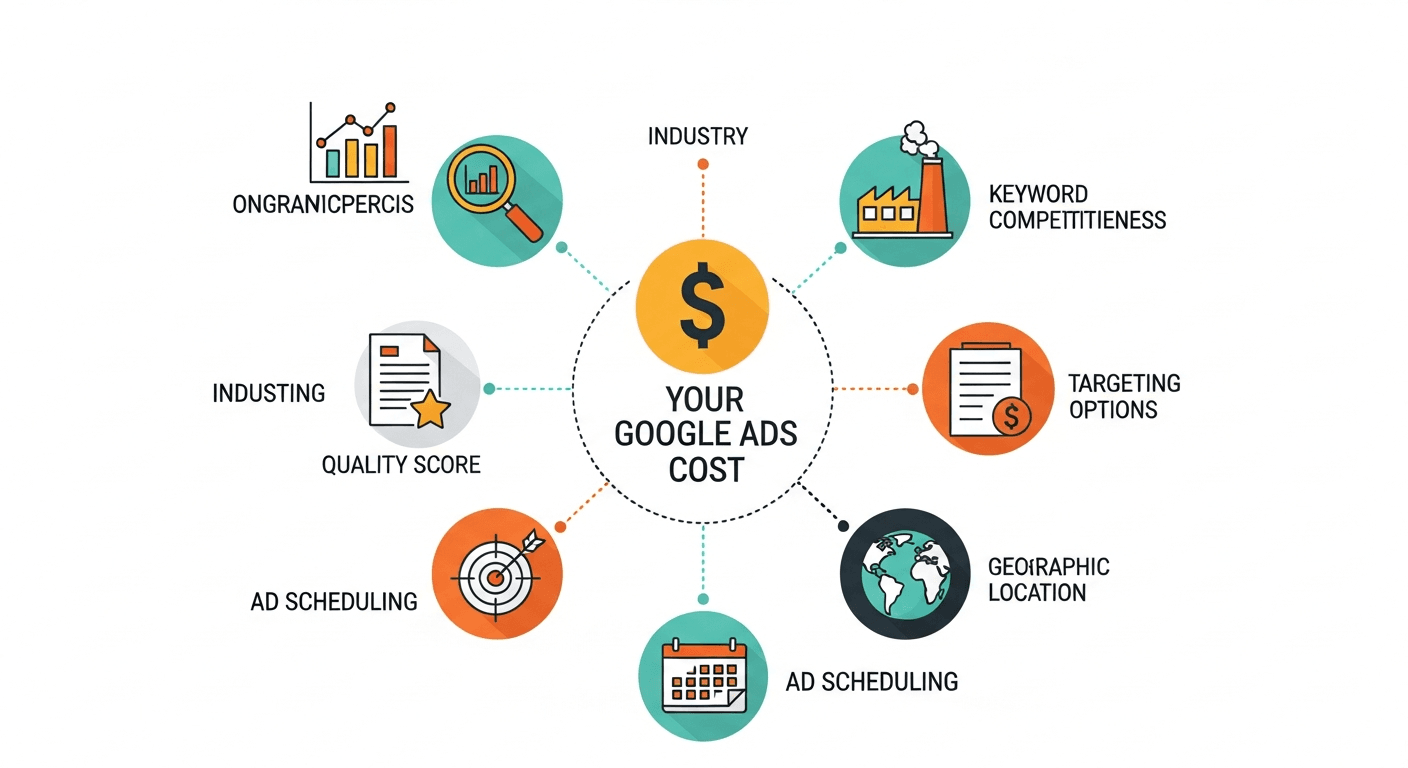
Factors Influencing Google Ads Pricing
Understanding Google Ads (Previously Google AdWords) pricing requires a closer look at several influential factors. This section dives into industry-specific costs, the effectiveness of different ad types, and the impact of the customer lifecycle on advertising expenses.
Industry-Specific Costs
Every industry has its unique characteristics that influence how much advertisers pay for Google Ads. Some industries, such as legal services, insurance, and real estate, face intense competition, which drives up the cost per click (CPC).
For example, in the legal industry, average CPCs can exceed ₹3,000 due to high-value customer acquisition. Conversely, industries like entertainment or arts tend to have lower CPCs, as they face less competition.
Here’s a quick breakdown:
High-Cost Industries:Legal Services: High competition and high potential revenue from a single client can lead to average CPCs exceeding ₹3,000. Keywords related to personal injury, family law, and criminal defense are often among the most expensive.
- Insurance: The competitive nature of the insurance sector, along with the potential lifetime value of a client, results in CPCs that can also reach high levels, typically around ₹2,500 to ₹3,000.
- Banking and Finance: Keywords related to loans, credit cards, and investments often see CPCs ranging from ₹1,500 to ₹2,800. Advertisers in these sectors are prepared to pay a premium for qualified leads.
Moderate-Cost Industries:
- E-commerce: The average CPC may vary from ₹50 to ₹600, depending on the product type and competition. High-margin products, such as electronics or luxury goods, tend to drive higher bids due to greater profitability. On the other hand, everyday consumer goods may witness a more competitive landscape with lower CPCs.
- Travel and Hospitality: CPCs in this sector often fall between ₹200 and ₹1,200, depending on the destination and time of year. Peak travel seasons, such as summer vacations or year-end holidays, lead to increased bidding as more advertisers compete for visibility. Keywords related to popular tourist spots or luxury resorts can command higher bids, reflecting both competition and potential customer value.
- Education: The education sector sees CPCs typically ranging from ₹100 to ₹800. Online courses, certifications, and higher education institutions compete for prospective students, and the varying price points reflect the broad spectrum of offerings. For example, universities may pay more to attract leads for graduate programs compared to community colleges targeting local students.
Low-Cost Industries:
- Local Services: Businesses such as plumbing, landscaping,
- Arts and Entertainment: Typically lower competition and lower CPCs, making it easier for smaller businesses to advertise.
🔑 Key Takeaway: Five factors control your Google Ads cost in India — industry competition, Quality Score, keyword demand, ad placement, and seasonality. Of these, Quality Score is the only one entirely within your control. Improving it from 4 to 7 can reduce your CPC by up to 50% without changing your budget.
Ad Type Effectiveness
The type of ads you choose to run can significantly impact your Google Ads costs. Different formats yield different performance and cost-effectiveness:
- Search Ads: Generally effective for immediate intent-driven searches. CPCs can vary widely, but they often convert better than other formats.
- Display Ads: These ads might achieve lower CPCs but can have lower conversion rates as they rely on awareness rather than immediate intent.
- Video Ads: Usually cost less to run per click, but the effectiveness can depend on the engaging power of the content created. Increasingly popular, especially for brand engagement.
A mix of ad types tailored to your goals can optimize costs. Consider A/B testing different ad formats to identify which delivers better results at a lower cost.
Keywords
When launching a Google Ads campaign, the choice of keywords plays a pivotal role in determining overall costs.
Keywords can be likened to the backbone of your advertising strategy. They connect what potential customers are searching for with the ads you’re running.
The complexity starts when we consider the competition for specific keywords. High-demand keywords often translate to higher costs.
For instance, if you're in the real estate sector, commonly sought terms like "buy homes in [city]" can be extremely competitive and might cost upwards of ₹50 per click, whereas niche keywords may only set you back ₹10.
Here’s a breakdown of keyword categories:
High-Competition Keywords:
- Cost: ₹40-₹150 per click
- Examples: Mortgage, personal loans, insurance
Medium-Competition Keywords:
- Cost: ₹20-₹30 per click
- Examples: Affordable wedding venues, SEO services
Low-Competition Keywords:
- Cost: ₹5-₹15 per click
- Examples: Local handmade jewelry, eco-friendly cleaning products
Choosing the right keywords is essential to optimize ad spending and achieve better ROI, so conducting thorough keyword research is non-negotiable.
Performance Max Campaigns: What They Cost in India (2026)
Performance Max (PMax) is Google's all-in-one campaign type that runs your ads across Search, Display, YouTube, Gmail, Maps, and Discover — all from a single campaign. Google launched PMax as the default recommendation for most advertisers in 2023, and by 2026 it is the dominant campaign type used by Indian businesses of all sizes.
How Performance Max Works
Instead of managing separate campaigns for each Google channel, PMax uses Google's AI to automatically allocate your budget to whichever placements are most likely to convert. You provide:
-
Asset groups: Headlines, descriptions, images, logos, and videos
-
Audience signals: Your customer list, website visitors, or interest-based audiences
-
Conversion goals: Purchases, leads, calls, or store visits
Google's algorithm then decides when, where, and to whom your ads appear.
Performance Max CPC in India (2026)
PMax doesn't report a single CPC — it blends costs across channels. Here's what Indian advertisers typically see:
| Channel within PMax | Average CPC/CPM (India, 2026) |
|---|---|
| Search (within PMax) | ₹18–₹80 |
| Display | ₹2–₹15 per click / ₹40–₹80 CPM |
| YouTube (skippable) | ₹0.25–₹1.50 per view / ₹120–₹350 CPM |
| Gmail | ₹3–₹20 per click |
| Google Maps | ₹8–₹40 per click |
| Blended PMax average | ₹15–₹60 per click |
The blended CPC is typically 20–35% lower than a standalone Search campaign for the same budget, because Google distributes spend across cheaper Display and YouTube inventory.
When to Use Performance Max vs. Search-Only Campaigns
| Scenario | Best Campaign Type |
|---|---|
| You have a clear keyword list and want control | Search Campaign |
| You want maximum reach with minimal management | Performance Max |
| You are an e-commerce brand with a product feed | PMax (integrates with Google Merchant Center) |
| You are running lead generation for B2B services | Search + PMax combo |
| Your monthly budget is under ₹20,000 | Search-only (PMax needs more budget to learn) |
| Your budget is ₹50,000+/month | PMax recommended |
🔑 Key Takeaway: Performance Max works best when you have a monthly budget of ₹50,000+, clear conversion tracking set up, and at least 30–50 conversions per month. Below that threshold, a focused Search campaign gives you more control and more predictable results.
Performance Max in India: What to Watch Out For
-
Limited search term visibility: PMax does not show the full list of search terms your ads matched — a known transparency issue Google has only partially addressed
-
Asset quality matters more than budget: Poor-quality images or generic headlines will result in wasted spend even with a large budget
-
Audience signals are not targeting: PMax treats audience signals as suggestions, not restrictions — Google may still show ads outside your defined audience
-
Brand cannibalization: PMax can compete with your own branded Search campaigns; use brand exclusions to prevent this
Setting Up Performance Max for an Indian Business: Minimum Requirements
-
Conversion tracking must be working before launching PMax — without it, Google has no signal to optimise toward
-
Minimum 6–8 assets per asset group: 3–5 headlines, 2 descriptions, 3–5 images (at least one square, one landscape), 1 logo
-
Recommended minimum daily budget: ₹2,000/day (₹60,000/month) for the algorithm to exit the learning phase within 4–6 weeks
-
Add audience signals from Day 1: Upload your existing customer list or connect your Google Analytics 4 audience — this significantly shortens the learning period
Smart Bidding in Google Ads: How Automated Bidding Affects Your Costs
Smart Bidding is Google's suite of automated bid strategies that use machine learning to set your bids in real time — adjusting for device, location, time of day, search query intent, and user behaviour at every single auction. For Indian advertisers, choosing the right Smart Bidding strategy is one of the highest-impact decisions you can make, directly controlling how much you pay per click, per lead, or per sale.
There are four core Smart Bidding strategies, each suited to a different campaign goal and maturity stage.
The 4 Smart Bidding Strategies Explained
1. Maximize Clicks
Goal: Get as many website visits as possible within your budget.
How it works: Google automatically sets bids to bring the highest possible number of clicks without exceeding your daily budget. You can optionally set a maximum CPC cap.
Best for: New campaigns with no conversion history, brand awareness campaigns, or high-traffic blog content.
India CPC impact: Typically delivers the lowest CPC (₹8–₹30 for most industries) but attracts the broadest, least-qualified traffic. Use this only in the first 2–4 weeks of a new campaign while building conversion data.
Watch out for: Click volume without conversion tracking means you're optimising for vanity metrics — switch to a conversion-based strategy as soon as you have 30+ conversions.
2. Maximize Conversions
Goal: Get the highest number of conversions within your daily budget.
How it works: Google spends your full daily budget and adjusts bids to maximise total conversion count — regardless of what each conversion costs.
Best for: Campaigns with an established conversion history (30+ conversions/month) where volume matters more than efficiency.
India CPC impact: CPC typically rises 20–40% vs. Maximize Clicks because Google targets higher-intent users, but conversion rate also rises, making the overall CPL (Cost Per Lead) competitive.
Example: A Delhi-based coaching institute switched from Maximize Clicks (₹28 CPC, 2.1% CVR) to Maximize Conversions (₹41 CPC, 5.8% CVR). Their CPL dropped from ₹1,333 to ₹707 — a 47% improvement — despite paying more per click.
3. Target CPA (Cost Per Acquisition)
Goal: Get conversions at or below a specific cost per conversion that you define.
How it works: You set a target CPA (e.g., ₹500 per lead). Google raises or lowers bids in each auction to hit that average target across your campaign. Some conversions will cost more, some less — Google averages toward your target.
Best for: Lead generation campaigns with a clear value per lead, e-commerce with a defined profit margin, or any campaign where cost efficiency is the priority.
Minimum requirement: At least 30–50 conversions in the past 30 days before activating. Below this, the algorithm has insufficient data and will underdeliver or overspend.
India benchmark Target CPAs by industry:
| Industry | Realistic Target CPA (₹) |
|---|---|
| E-commerce (product purchase) | ₹150–₹600 |
| Education (course enquiry) | ₹200–₹800 |
| Real Estate (property enquiry) | ₹800–₹3,000 |
| Healthcare (appointment booking) | ₹300–₹1,200 |
| Finance (loan/insurance lead) | ₹500–₹2,500 |
| Local Services (call/form) | ₹100–₹400 |
| SaaS / B2B (demo request) | ₹1,500–₹6,000 |
Pro tip: Start your Target CPA at 20–30% above your current actual CPA, then reduce it by 10% every 2 weeks once the campaign stabilises. Dropping it too aggressively causes impression share to collapse.
4. Target ROAS (Return on Ad Spend)
Goal: Generate a specific return for every rupee spent on ads.
How it works: You set a Target ROAS percentage (e.g., 400% = ₹4 revenue for every ₹1 spent). Google automatically adjusts bids to prioritise the highest-value conversions, not just the highest volume.
Best for: E-commerce stores with Google Merchant Center connected, businesses with varying product/service values, or any campaign where revenue per conversion differs significantly.
Minimum requirement: At least 50 conversions with conversion values in the past 30 days. This is the most data-hungry Smart Bidding strategy.
India ROAS benchmarks:
| Sector | Average Google Ads ROAS (India, 2026) |
|---|---|
| E-commerce (fashion/lifestyle) | 300–500% |
| Electronics | 200–350% |
| D2C / FMCG | 250–450% |
| Travel & Hospitality | 400–700% |
| Education (online courses) | 300–600% |
Example: A Mumbai-based D2C skincare brand set a Target ROAS of 400% on a ₹1,20,000/month budget. After a 6-week learning period, Google consistently delivered ₹4.2–₹4.8 in revenue per ₹1 spent, generating ₹5,04,000–₹5,76,000 in monthly revenue from ads.
Smart Bidding Comparison Table
| Strategy | Goal | Min. Conversions Needed | Controls Cost? | Best Stage |
|---|---|---|---|---|
| Maximize Clicks | Traffic volume | None | Partial (CPC cap) | New campaigns |
| Maximize Conversions | Conversion volume | 30+/month | No | Growth phase |
| Target CPA | Cost efficiency | 30–50/month | Yes | Mature campaigns |
| Target ROAS | Revenue efficiency | 50+/month | Yes (via value) | E-commerce / high AOV |
The Smart Bidding Learning Period: What It Costs You
Every time you switch bid strategies, change your target CPA/ROAS by more than 15%, or make significant campaign changes, Google re-enters a learning period of 1–2 weeks. During this time:
-
Performance fluctuates significantly
-
CPCs can spike 30–80% above normal
-
Conversion rates may drop temporarily
What to do: Budget for 2 weeks of higher-than-normal CPCs every time you make a major change. Avoid making multiple changes simultaneously — change one variable at a time and wait 7–10 days before evaluating results.
🔑 Key Takeaway: New Indian advertisers should start with Maximize Clicks for 3–4 weeks to build conversion data, then switch to Maximize Conversions, and finally graduate to Target CPA or Target ROAS once they have 30–50 monthly conversions. Skipping this progression is the #1 reason Indian campaigns overspend in their first 60 days.
Enhanced CPC (eCPC) — The Hybrid Option
Enhanced CPC is a semi-automated option that adjusts your manual bids up or down by up to 30% based on the likelihood of conversion. It's the safest entry point into automation for advertisers who want some control but aren't ready to hand full bidding authority to Google.
-
Best for: Advertisers with fewer than 30 conversions/month who still want some AI assistance
-
India CPC impact: Typically 10–20% higher CPC than pure manual bidding, but 15–30% better CVR
-
Note: Google has been gradually deprecating eCPC — it may be fully removed by late 2026, so plan to migrate to a full Smart Bidding strategy
Ad Placement
Another significant factor that deeply impacts PPC pricing is ad placement. The positioning of your ad within the search results can drastically affect both visibility and click costs.
Google uses a unique auction system that considers your Ad Rank, which is a combination of your bid and Quality Score. Although it may seem intuitive to secure the top position, it can come at a premium.
Data suggests that:
- Top Position Ads: Often commanding a higher price, up to 30% more than those displayed lower on the results page.
- Second and Third Position Ads: These can maintain competitive visibility while potentially incurring lower costs, making them a strategic choice for budget-conscious businesses.
Here are some tips for managing ad placements effectively:
- Focus on Ad Quality: A higher Quality Score can lower costs even for premium placements.
- Dynamic Bidding: Adjust bids based on performance and position rather than a static strategy.
- Testing Different Positions: Experimenting with varying placements can unveil the best cost-to-click ratios for your audience.
Being mindful of keyword selection and ad placement not only impacts overall ad spending but also enhances the likelihood of conversions.
Leveraging these factors strategically, businesses can optimize their PPC campaigns for better returns
Customer Lifecycle Impact
The customer journey plays a critical role in determining ad strategy and costs. Understanding where your prospective customers are in their lifecycle can guide your ad spending effectively:
- Awareness Stage: Lower immediate ad costs with a focus on building brand recognition.
- Consideration Stage: Higher spending may be required as customers compare options, necessitating targeted ads.
- Decision Stage: The final push, where tailored PPC strategies can yield high ROI but require more investment.
By segmenting your advertising efforts based on the customer lifecycle stage, businesses can better allocate budgets and improve overall campaign ROI. In summary, Google Ads pricing is not a one-size-fits-all scenario. By considering industry specifics, ad types, and customer lifecycles, advertisers can make informed decisions about how to engage effectively with their audiences.
Average Cost-Per-Click (CPC) Rates
Understanding Cost-Per-Click (CPC) rates is essential for businesses looking to make the most of their Google Ads campaigns. In this section, we will explore an overview of CPC in India, provide a comparison by industry, and discuss seasonal variations in CPC rates.
Overview of CPC in India
In India, the average CPC for Google Search ads in India is ₹24 in 2026 (Source: intentfarm.com India PPC benchmark, 2026), with competitive industries pushing this to ₹3,000+ per click.
Imagine you're running a campaign for a local bakery. If your targeted keyword is “fresh bakery items,” you might find the CPC around ₹15. In contrast, if you’re in a high-stakes industry like legal services, clicks can escalate to ₹100 or more due to fierce competition.
Comparison by Industry
Industries significantly influence CPC rates due to varying competition levels and customer lifetime values.
Here’s a glimpse into average CPC rates across several sectors:
| Industry | Average CPC (₹) 2026 |
|---|---|
| Legal Services | ₹1,500–₹3,000+ |
| Insurance | ₹800–₹2,500 |
| Banking & Finance | ₹400–₹1,200 |
| Healthcare | ₹150–₹600 |
| Real Estate | ₹80–₹400 |
| E-Commerce | ₹20–₹150 |
| Education | ₹15–₹80 |
| Automotive | ₹30–₹120 |
| Travel & Hospitality | ₹50–₹300 |
| Local Services | ₹8–₹40 |
Source: Industry benchmarks aggregated from WordStream (2025), LocaliQ India benchmarks, and SEMrush India data. Last updated: June 2026.
The disparity in costs illustrates why tailoring ad strategies is crucial. A legal firm needs to allocate a more significant budget than a local educational institution to achieve comparable visibility.
Seasonal Variations in CPC
CPC rates can shift with seasons, affecting your ad strategies. For instance, during holiday seasons or festivals, keywords associated with gifts, apparel, and travel may see a spike in competition, driving up costs. Conversely, off-peak times might provide more affordable rates:
High Competition Seasons:
- Diwali: Increased searches for gifts and festivities can double CPC.
- Summer Vacations: Travel-related keywords often experience a cost surge.
Low Competition Seasons:
- Post-holidays: The period after major shopping seasons may result in reduced CPC.
Companies that understand these seasonal trends can strategically time their campaigns and allocate budgets more effectively, reaping better returns on their investments. In summary, grasping the nuances of CPC in India, how it varies by industry, and adjusting for seasonal changes is fundamental for optimizing Google Ads performance. By doing so, businesses can ensure they spend wisely while maximizing their reach.
🔑 Key Takeaway: The 2026 average CPC in India is ₹24 for Search campaigns, but this number is nearly meaningless without industry context. Legal and finance advertisers pay 60–125x more per click than local service businesses. Always benchmark your CPC against your specific industry, not the national average.
Google Ads Budgeting Strategies
Navigating Google Ads can be an overwhelming experience, especially when it comes to budgeting. Being strategic about how you allocate your funds can significantly impact your advertising success. This section will break down effective budgeting strategies, including setting realistic budgets, the differences between daily and monthly budgets, and how to adjust your expenditures based on campaign performance.
Setting a Realistic Budget
The foundation of a successful Google Ads campaign starts with a well-thought-out budget. It’s essential to establish a budget that aligns with your business objectives and marketing goals while taking into account the competitive landscape of your industry.
- Evaluate Your Goals: Specify what you hope to achieve (e.g., brand awareness, lead generation, sales), as this will inform your budget.
- Understand Costs: Know the average CPC for your target keywords. For instance, if the average CPC is ₹20, and you want to acquire 100 clicks, have a minimum budget of ₹2000.
- Consider Agency Fees: If you’re employing an agency for management, include these fees—often ranging from ₹12,000 to ₹50,000 depending on the service scope.
A realistic budget ensures that you stay competitive without overspending, setting you up for measurable success.
Daily vs. Monthly Budgets
You need to choose between a daily budget or a monthly budget for Google Ads.
Each has its advantages:
- Daily Budgets:
-
- Flexibility: You can adjust based on real-time insights.
- Granular Control: Helps prevent your budget from depleting too quickly during high-traffic days.
For example, if you set a daily budget of ₹1,000 and your average CPC is ₹20, you can afford around 50 clicks per day.
- Monthly Budgets:
-
- Comprehensive Planning: Allows businesses to holistically assess performance over a longer term.
- Consistency: Helps maintain stable spending patterns across the month.
Setting a monthly budget of ₹30,000 translates to ₹1,000 per day on average. However, adjustments may be necessary based on specific days or campaigns that perform exceptionally well.
Adjusting Budgets Based on Performance
Monitoring performance is key to optimizing your Google Ads budget. Utilize metrics such as click-through rates (CTR), conversion rates, and return on ad spend (ROAS) to assess your campaigns. Here’s how you can adjust:
- Underperforming Ads: If certain keywords or ads are costing more than they yield, consider reallocating that budget to higher-performing areas.
- Successful Campaigns: Increase the budget for ads earning a higher ROAS. For instance, if a specific keyword is converting well, divert funds towards it to maximize your results.
Regularly reviewing and adjusting your budget based on performance metrics ensures your ad spend is optimized for success. In conclusion, effective budgeting strategies for Google Ads are about knowing your goals, setting a reasonable budget, being flexible with daily versus monthly allocations, and actively adjusting based on performance. By employing these strategies, you can make the most of your Google Ads investment while achieving desired outcomes.
Importance of Keyword Selection
Selecting the right keywords is a cornerstone of a successful Google Ads campaign. The choice of keywords can make or break your advertising efforts, impacting both costs and overall effectiveness. This section will delve into how keywords affect costs, tools for effective keyword research, and the differences between long-tail and short-tail keywords.
How Keywords Affect Costs
Keywords play a crucial role in determining the cost of your Google Ads. The more competitive a keyword, the higher the cost per click (CPC) is likely to be. For example, high-demand keywords in industries like legal services or finance can see CPCs exceeding ₹100, while a more niche keyword might only cost around ₹20. Here’s how keywords influence your advertising expenses:
- CPC Variability: Competitive keywords with high search volume can drastically raise your CPC.
- Ad Relevance: Using relevant keywords can improve your Quality Score — a crucial metric that Google uses to determine your ad ranking. A higher Quality Score can lower your CPC.
- Industry Trends: Keep an eye on market trends, as certain keywords may become more competitive over time, impacting your budgets accordingly.
Understanding search intent is crucial. Keywords indicating high purchase intent (e.g., "buy best running shoes") will generally have higher CPCs than those with informational intent (e.g., "what are the benefits of running"). While higher CPCs might seem daunting, keywords with strong purchase intent are often more valuable because they are more likely to lead to a conversion.
🔑 Key Takeaway: Long-tail keywords (3–5 words) typically cost 40–70% less per click than short-tail keywords in India, and convert at 2–3x higher rates because they capture specific purchase intent. For most Indian SMBs, a long-tail-first keyword strategy delivers better ROI than competing on high-volume generic terms.
The Critical Role of Quality Score in Reducing Ad Spend
As previously mentioned, Quality Score is paramount in managing your ad spend. A Quality Score is a diagnostic tool that estimates the quality of your ads, keywords, and landing pages. Scores range from 1 to 10, with higher scores indicating better quality and relevance.
Google considers three main components when assessing your Quality Score:
- Expected Click-Through Rate (CTR): The likelihood that your ad will be clicked when shown.
- Ad Relevance: How closely your ad matches the user's search query.
- Landing Page Experience: How relevant and user-friendly your landing page is after a user clicks on your ad.
A high Quality Score directly leads to lower CPCs and better ad positions. Conversely, a low Quality Score means you'll pay more for less prominent ad placements, significantly increasing your ad spend without a proportional increase in results. Improving your Quality Score is one of the most effective ways to reduce your costs and improve your campaign performance.
Tools for Keyword Research
To maximize your advertising potential, it’s important to leverage keyword research tools. These tools help you discover high-performing keywords relevant to your market:
- Google Keyword Planner: Provides insight into monthly search volumes, CPC ranges, and keyword suggestions.
- SEMrush: Offers comprehensive keyword analysis, including competitors’ keywords and organic search data.
- Ahrefs: Great for finding keyword difficulty and click-through rates.
Using these tools isn’t just beneficial for your initial keyword selection; they can also help in ongoing optimization as you refine your campaign.
Long-Tail vs. Short-Tail Keywords
Understanding the difference between long-tail and short-tail keywords is vital for formulating an effective strategy:
Short-Tail Keywords:
- Typically more general (e.g., "shoes," "electronics").
- Higher search volumes but more competition, leading to increased CPC.
- Best for broad brand awareness and reaching a large audience.
Long-Tail Keywords:
- More specific phrases (e.g., "best running shoes for flat feet," "affordable electronics in Delhi").
- Lower search volumes but often have lower competition and CPC, leading to cost-effective advertising.
- Higher conversion rates as users are generally more targeted in their intent.
Using a blend of both long-tail and short-tail keywords can help balance your reach with cost-effectiveness while targeting various stages of the customer journey.
Businesses can achieve greater success in Google Ads by understanding cost factors, using the right research tools, and recognizing the benefits of various keyword types.
Effective keyword strategies directly contribute to higher search visibility and better return on investment.
Additional Costs in Google Ads Management
When budgeting for Google Ads, it's crucial to consider not only the cost per click (CPC) but also the additional expenses involved in managing your campaigns effectively. This section will cover agency fees and services, tracking and analytics tools, and remarketing campaign costs.
Agency Fees and Services
Many businesses opt to hire PPC agencies to manage their Google Ads campaigns, which can be an excellent investment. Agency fees in India typically range from ₹15,000 ($150) to ₹1,00,000 ($1,200) per month, depending on the scope of services provided.
Here’s what you can expect with agency costs:
Agency Management Fee:Starting from ₹15,000 for basic services, which may include:
- Campaign setup
- Keyword research
- Ad copywriting
- Continuous optimization and reporting
Performance-Based Fees: Some agencies might charge a percentage of total ad spend, ensuring their interests are aligned with the success of your campaigns.
While it may seem like an additional cost up front, working with a professional agency can often lead to more effective campaigns, better ROI, and time savings in managing the intricacies of Google Ads.
Tracking and Analytics Tools
Another vital part of your Google Ads budget should include the cost of tracking and analytics tools. Effectively monitoring your ad performance allows for data-driven decisions, which can enhance campaign effectiveness. Common tools include:
- Google Analytics: A free tool that provides insights into how users interact with your site after clicking your ads.
- Google Tag Manager: Also free, this tool helps manage scripts and tags for easy tracking.
- Third-Party Analytics Tools: While some of these have costs associated, platforms like SEMrush and HubSpot offer deeper insights for a fee.
Investing in these tools can improve your advertising strategies, ensuring you can pivot based on real-time data to maximize your budget.
Remarketing Campaign Costs
Remarketing is an effective strategy to re-engage users who have previously visited your website. While it can lead to improved conversion rates, it also comes with its own set of costs:
- Additional CPC: Similar to standard campaigns, you’ll pay for every click on your remarketing ads, which can be lower than conventional CPC due to targeted audiences.
- Creative Development: Designing effective remarketing ads might require a budget for graphic design, video production, or copywriting services.
- Additional Tracking Costs: Ensure that your tracking is set up effectively to monitor the performance of your remarketing efforts.
Remarketing campaigns may cost more but generally offer a better return on investment due to their targeted nature. It's important to consider these extra expenses, including agency services and tracking tools, for an effective Google Ads strategy.
🔑 Key Takeaway: Your true monthly Google Ads investment is ad spend + 18% GST + agency fee + 18% GST on agency fee. A ₹50,000 ad budget managed by an agency at ₹15,000/month costs ₹76,700/month in total. GST-registered businesses can recover the full ₹10,800 GST component as Input Tax Credit, reducing net cost to ₹65,900.
18% GST on Google Ads in India: What It Means for Your Budget
Every rupee you spend on Google Ads in India attracts 18% GST (Goods and Services Tax), charged by Google India Pvt. Ltd. under SAC code 998361. This means if your monthly Google Ads budget is ₹1,00,000, your actual total invoice from Google is ₹1,18,000. Most advertisers especially first-timers forget to account for this, leading to budget shortfalls mid-campaign.
How GST on Google Ads Works
Google India Pvt. Ltd. is registered as a GST-compliant entity and issues a proper tax invoice for every billing cycle. The GST is applied on your total ad spend, not on management fees separately.
Example:
| Budget Component | Amount |
|---|---|
| Monthly Ad Spend Budget | ₹50,000 |
| 18% GST on Ad Spend | ₹9,000 |
| Total Charged by Google | ₹59,000 |
| Agency Management Fee (if applicable) | ₹10,000–₹15,000 |
| 18% GST on Agency Fee | ₹1,800–₹2,700 |
| Total Effective Monthly Cost | ₹70,800–₹76,700 |
This means your true cost of running ₹50,000 in Google Ads through an agency is ₹70,800–₹76,700/month, 41–53% above the headline ad budget number.
Can You Claim GST Input Tax Credit (ITC) on Google Ads?
Yes — if your business is GST-registered, you can claim the full 18% GST paid on Google Ads as Input Tax Credit (ITC), effectively making the GST cost neutral. This is one of the most overlooked tax advantages for Indian businesses running digital advertising.
To claim ITC on Google Ads:
-
Add your GSTIN to your Google Ads account:
-
Go to Google Ads → Settings → Billing → Billing information
-
Enter your 15-digit GSTIN under "Tax information"
-
Google will begin issuing GST-compliant invoices with your GSTIN within the next billing cycle
-
-
Verify the invoice in GSTR-2B:
-
Google India Pvt. Ltd. files its GST returns regularly
-
Your purchases will reflect in your GSTR-2B auto-populated credit ledger
-
Match this with your Google Ads invoice before filing your own GST return
-
-
Claim ITC in GSTR-3B:
-
Report the ITC under "Input Tax Credit Available" → "All other ITC"
-
This offsets your GST liability for the month
-
Who can claim ITC:
-
✅ GST-registered businesses (regular or composition scheme with certain conditions)
-
✅ Agencies running ads on behalf of clients (claim on management fee GST; client claims on ad spend GST)
-
❌ Individuals and unregistered businesses cannot claim ITC
GST on Google Ads: Registered vs. Unregistered Business Impact
| Business Type | GST Paid | ITC Claimable | Net GST Cost |
|---|---|---|---|
| GST-Registered Business | 18% | Yes (full) | ₹0 (neutral) |
| Composition Scheme Taxpayer | 18% | Partial (check with CA) | Low |
| Unregistered Business / Individual | 18% | No | Full 18% extra cost |
| NGO / Exempt Entity | 18% | No | Full 18% extra cost |
Practical implication: If you are an unregistered business spending ₹30,000/month on Google Ads, you are paying ₹5,400/month - ₹64,800/year - in GST that you cannot recover. This is a strong financial reason to register for GST if your business turnover is approaching the threshold (₹20 lakh for services, ₹40 lakh for goods).
GST on Google Ads vs. Meta Ads vs. Other Platforms
| Platform | GST Applicable | Rate | ITC Claimable |
|---|---|---|---|
| Google Ads (India) | Yes | 18% | Yes (if registered) |
| Meta Ads / Facebook Ads | Yes | 18% | Yes (if registered) |
| LinkedIn Ads | Yes | 18% | Yes (if registered) |
| Microsoft / Bing Ads | Yes | 18% | Yes (if registered) |
| Hotstar / OTT Ads | Yes | 18% | Yes (if registered) |
All major digital advertising platforms operating in India charge 18% GST , this is not unique to Google. However, Google Ads typically represents the largest share of digital ad budgets for Indian businesses, making GST management most critical here.
Common GST Mistakes Indian Google Ads Advertisers Make
-
Not adding GSTIN to Google Ads account — results in non-compliant invoices that cannot be used for ITC claims
-
Budgeting ₹X without accounting for 18% on top leads to campaigns running out of budget before month-end
-
Agency not separating ad spend GST from management fee GST both are claimable but must be tracked separately
-
Not reconciling GSTR-2B before filing Google's filing date may differ from your billing date, causing mismatches
-
Assuming GST on ads is under Reverse Charge Mechanism (RCM) Google India Pvt. Ltd. charges GST directly (forward charge), not RCM, since they are registered in India
How to Add Your GSTIN to Google Ads: Step-by-Step
-
Sign in to your Google Ads account
-
Click the tools icon (⚙️) in the top right
-
Go to Billing → Settings
-
Scroll to "Tax information"
-
Click Edit → Enter your 15-digit GSTIN
-
Select your business type (Regular, Composition, etc.)
-
Click Save
Google will apply your GSTIN to all future invoices. For past invoices, you may need to raise a request with Google Ads Support to reissue them with your GSTIN — this is possible for invoices within the current financial year.
🔑 Key Takeaway: Always budget 18% above your intended Google Ads spend to account for GST. If your business is GST-registered, add your GSTIN to your Google Ads account immediately — this makes the 18% tax fully recoverable as Input Tax Credit, bringing your net GST cost to zero.
Comparing Google Ads Costs to Other Platforms
When considering digital advertising, Google Ads frequently comes to mind due to its extensive reach and effectiveness. However, other platforms like Facebook, LinkedIn, and Instagram offer unique advantages and varying costs. Understanding how these platforms stack up against Google Ads can help you make informed decisions for your marketing strategies.
Facebook Ads
Facebook Ads are renowned for their robust targeting capabilities, making them an appealing option for many businesses. The average cost per click (CPC) for Facebook Ads ranges from ₹5 to ₹15, significantly lower than that of Google Search Ads, which average around ₹20. Here’s what to consider:
- Targeting Options: Facebook allows you to segment audiences based on interests, behaviors, and demographics, helping you reach potential customers with precision.
- Ad Formats: Facebook provides various ad formats, including image, video, carousel, and stories, which can enhance engagement.
- Cost-Effectiveness: With lower CPCs, Facebook can be a budget-friendly alternative for brands looking to maximize their reach and engagement.
For brands that thrive on visual content or social interaction, Facebook Ads can deliver great value at a more accessible price point.
LinkedIn Ads
For B2B companies, LinkedIn Ads are an indispensable tool. The CPC for LinkedIn typically ranges from ₹40 to ₹60, making it more expensive compared to Google and Facebook Ads. However, this investment can yield high returns due to its professional environment:
- Audience Quality: LinkedIn targets professionals based on job title, industry, and company size, allowing businesses to connect with decision-makers directly.
- High-Value Clicks: While the CPC is higher, the potential deal sizes in B2B marketing often justify the cost.
- Ad Types: LinkedIn offers Sponsored Content, InMail, and Text Ads, providing various options that can cater to specific marketing goals.
If your goal is to connect with corporate clients or professionals, investing in LinkedIn Ads can be well worth the price.
Instagram Ads
As an established sibling of Facebook, Instagram Ads also leverage similar pricing structures. The average CPC for Instagram Ads typically falls within the ₹5 to ₹12 range. Here’s what makes Instagram attractive:
- Visual Appeal: The platform is ideal for brands with strong visual content, appealing to users through eye-catching images and videos.
- Integration with Facebook: Given that Instagram Ads are managed through the Facebook Ads Manager, advertisers can benefit from combined targeting features and analytics.
- Engagement Rates: Instagram boasts high engagement rates, especially among younger demographics, making it a powerful platform for lifestyle brands, fashion, and e-commerce.
Brands focusing on strong visual narratives often find Instagram to be a compelling platform that can convert clicks into loyal customers. In conclusion, while Google Ads still reigns with its extensive reach and effectiveness, platforms like Facebook, LinkedIn, and Instagram provide various features and advantages that can align with different business goals and budgets. Evaluating the unique aspects and costs of these platforms can help marketers develop a holistic strategy that maximizes return on investment across their digital advertising efforts.
Effective PPC Management Practices
To get the most out of your Google Ads campaigns, implementing effective pay-per-click (PPC) management practices is essential. This section will delve into practical strategies such as daily monitoring and adjustments, A/B testing ad performance, and efficiently using negative keywords.
Daily Monitoring and Adjustments
Monitoring your PPC campaigns daily can be the difference between success and wasted spend. Here’s how to efficiently manage this task:
- Ad Performance Review: Daily check your ads' performance metrics including impressions, clicks, and conversions. This will help you quickly identify underperforming ads or keywords.
- Budget Adjustments: If you notice certain ads performing exceptionally well, consider reallocating more budget toward them. Conversely, if an ad isn’t generating clicks or conversions, lower its spend or pause it entirely.
- Competitive Analysis: Keep an eye on your competitors’ activities. Are they running promotions or new ads? Use this knowledge to adjust your own strategy accordingly.
For example, one campaign I managed saw increased conversion rates when we adjusted the budget daily based on performance, resulting in a 40% improvement in ROI.
A/B Testing Ad Performance
A/B testing, or split testing, is a vital practice in PPC management. By testing different versions of your ads, you can determine what resonates best with your audience. Here’s how to execute A/B tests effectively:
- Test Elements: Experiment with various elements of your ad, such as headlines, images, calls to action, and ad copy. For instance, changing a headline from "Buy Now" to "Limited Time Offer" can significantly impact click-through rates.
- Data Analysis: Once your ads have run for a sufficient time, analyze which version performed better based on key metrics like CTR and conversion rate.
- Iterate and Optimize: Use the winning ad copy or design as a basis for future ads. Continually cycle through this process to keep improving your campaign performance.
This method enables constant optimization, leading to ads that better connect with viewers and enhance conversion rates.
Using Negative Keywords Efficiently
Negative keywords are an often-underutilized yet powerful tool in PPC management. By filtering out search terms that are not relevant to your business, you can optimize your budget effectively:
- Identifying Negative Keywords: Regularly analyze search term reports to identify keywords that trigger clicks but do not convert. For example, if you sell premium shoes, you might want to add "cheap" or "discount" as negative keywords.
- Avoiding Wasted Spend: By eliminating irrelevant keywords, you avoid paying for clicks that are unlikely to convert. This ensures more of your budget is spent on ads that lead to conversions.
- Continuous Refinement: As your campaigns evolve and market behaviors change, revisit your negative keywords regularly and adjust as necessary.
Incorporating efficient use of negative keywords allows for better targeting, ultimately improving your ROI. In conclusion, daily monitoring, A/B testing, and the effective use of negative keywords are foundational practices that can dramatically enhance your PPC management. Employing these strategies will help ensure that your Google Ads campaigns are not just effective but continually optimized for success.
Common Questions About Google Ads Costs
When diving into Google Ads, many marketers and businesses have pressing questions about costs, budgeting, and overall effectiveness. It’s essential to address these common queries to create a strategy that maximizes returns on your ad spend. This section will explore key questions regarding Google Ads costs and offer insights to help your business thrive.
What Influences Google Ads Pricing?
Google Ads pricing is determined by five factors: industry competition, your Quality Score (1–10), keyword demand, geographic targeting, and seasonality. Competitive industries like legal and finance pay ₹800–₹3,000 per click, while education and local services average ₹8–₹50. A Quality Score above 7 reduces your CPC by 30–50% compared to a score of 3–4. Seasonal peaks like Diwali, IPL, and year-end sales can spike CPCs by 20–60% in relevant industries. The single biggest lever you control is Quality Score — improve your ad relevance and landing page experience to lower costs immediately.
What is the Minimum Budget for Google Ads in India?
There is no official minimum budget for Google Ads in India, you can technically start with ₹500/day - but ₹1,000-₹2,000/day (₹30,000–₹60,000/month) is the practical minimum to generate meaningful data and results.
At less than ₹500/day, your ads may show too infrequently to draw conclusions or optimise effectively. For competitive industries like real estate or insurance, a working budget starts at ₹3,000–₹5,000/day. Google recommends setting your daily budget at 10–20x your target CPC to ensure your ads get enough impressions and clicks to optimise within the learning period.
What Are the Additional Costs Involved?
Beyond the basic costs associated with Google Ads, businesses must consider potential additional expenses:
- Agency Fees: If you choose to work with a PPC agency, management fees typically range from ₹25,000 to ₹75,000, depending on the scope of services.
- Tracking Tools: Costs associated with analytics tools used to track ad performance, such as Google Analytics or other software options.
- Taxes: Remember that in India, an 18% tax is applied to your total ad spend, which can impact your overall budget and needs to be factored into your calculations.
How Long Before Google Ads Shows Results?
Most Google Ads campaigns in India show initial traffic within 24–48 hours of going live, but meaningful, optimisable results take 2–4 weeks.
Google's Smart Bidding algorithms require a minimum of 30–50 conversions per month to exit the learning phase and start optimising effectively. For new accounts with no conversion history, expect 4–6 weeks before bid strategies stabilise. Campaigns in high-competition sectors like finance or real estate may take 60–90 days to reach their optimal CPC and conversion rate. Consistency in budget and regular A/B testing of ad copy accelerates this timeline significantly.
This guide was last reviewed and updated on June 2, 2026 to reflect 2026 Google Ads benchmark data, Performance Max campaign changes, and updated GST guidelines for Indian advertisers.